 World Clock
Share a location, itinerary or meeting
Send someone a place they can open on a map, a flight itinerary they can edit or a meeting schedule in everyone’s local time.
Where to find itLocation or a place page › Share
Choose what to send
Pick Text for a message you can paste anywhere, a Card for an image, or both. For a meeting point, a short message with coordinates and a map link can be enough.
Choose the details and the map service
Include the place name, address, coordinates, date and time, or sunrise and sunset. Add current weather or the next seven days if useful. Include a map and adjust its zoom to show enough landmarks.
Turn on the map link and choose the service, such as Apple Maps, Google Maps, OpenStreetMap or Waze. When the card includes the link, it also includes a QR code that opens the place.
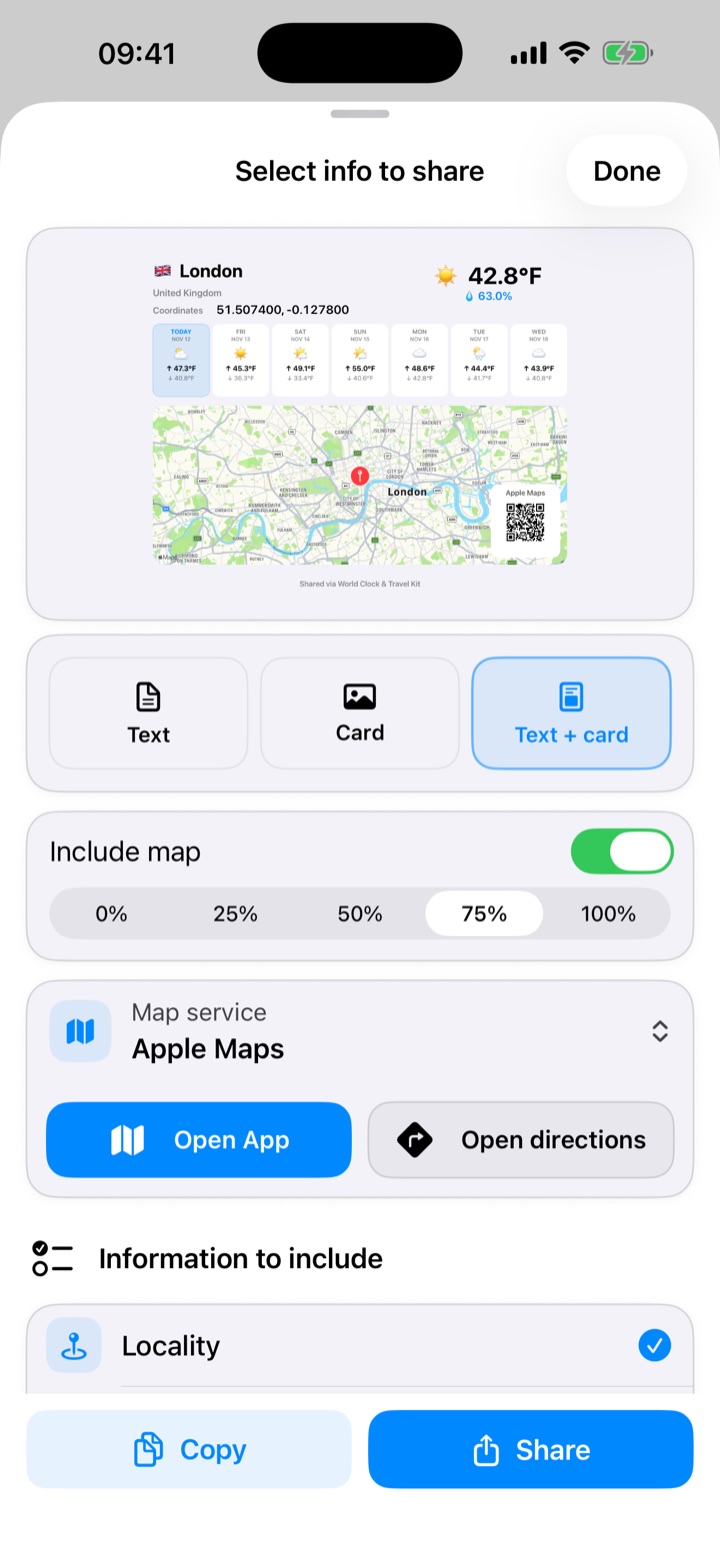
Preview and send
Inspect the preview before sharing. Pinch to zoom and double-tap to restore its size. Open the iOS share sheet for Messages, Mail or AirDrop. You can also copy the coordinates or save the card to Photos, granting permission the first time.
Share a trip or a meeting
Share a flight itinerary as an image or an editable file. In Meeting Planner, share an image of the comparison. A converted location can be sent as text or a card. To share the app itself, open Settings.